



 E-Commerce Setup
An invoice is a formal document issued by a business to its customer, detailing the provided goods or services and the corresponding payment required. It includes key information such as the company’s name, address, and contact details, along with specific payment terms. These details may cover payment deadlines, accepted payment methods, and potential late payment fees. The invoice serves as a critical element in a company’s accounting system, facilitating sales tracking, management of accounts receivable, and adherence to financial legal standards. This is an essential tool for maintaining transparent financial communications between a business and its clients. That’s why Shopify built a tool called Shopify Invoice Generator to be used in making an invoice most efficiently. In this article, we’ll show you how to use Shopify Invoice for your business or service.
Benefits of Using the Free Shopify Invoice Tool
- This Shopify Invoice Tool is a cost-effective solution. Utilizing the free Shopify invoice tool allows businesses to create professional invoices without incurring additional software costs.
- This tool can save you time. It is designed for efficiency, significantly reducing the time spent on invoice creation. Pre-set templates and automatic calculations streamline the process.
- You can customize your brand identity, by adding logos and customizing layouts, which enhances brand consistency and professionalism. The tool’s intuitive design makes it easy to use, even for those with limited technical skills.
- The tool automatically calculates totals, taxes, and discounts, minimizing errors that can occur with manual calculations. Also, Shopify invoices generated can be easily saved, organized, and retrieved for future reference, aiding in better financial record keeping.
- Being an online tool, it can be accessed from anywhere, allowing invoices to be generated on the go. Invoices can be instantly sent to customers via email, speeding up the billing process. Also, by using the Shopify invoice generator, businesses reduce paper usage, contributing to eco-friendly practices.
This tool is particularly beneficial for small to medium-sized businesses looking for a reliable, no-cost solution to manage their invoicing efficiently and professionally.
How to Create an Invoice Using the Shopify Invoice Tool
These steps provide a clear, efficient way to produce professional invoices, ensuring accuracy and consistency in your billing process. To create an invoice using Shopify invoice, follow these fast and easy steps:
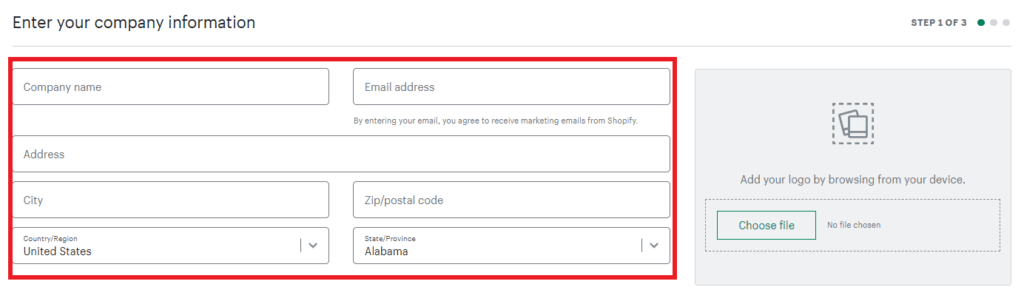
- Input Basic Information: Begin by filling in important details such as your business name, your contact information, and your client’s contact details. Double-check it for accuracy.
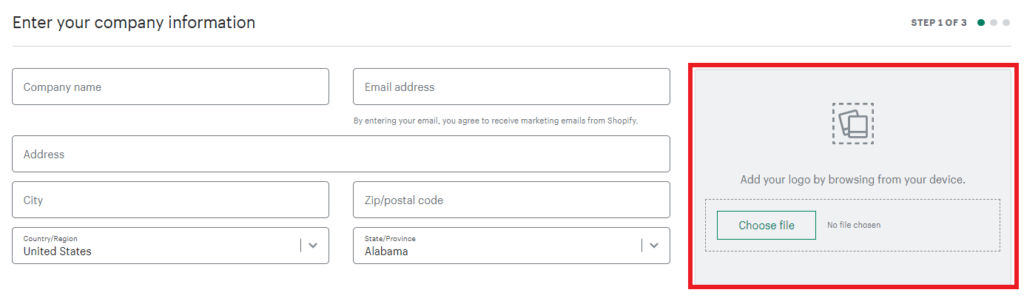
2. Customize the Invoice: Add your company logo to the invoice template. This helps in maintaining a consistent professional appearance across your business documents.
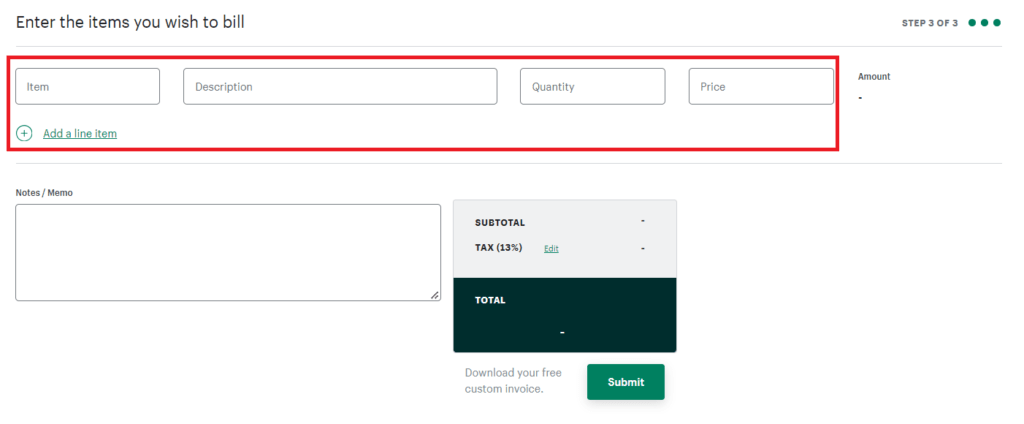
3. List the Items for Billing: Include all the items or services you are charging for. Utilize the ‘Add a Line Item’ option to enter details like quantity, description, hourly rates, or any discounts offered.
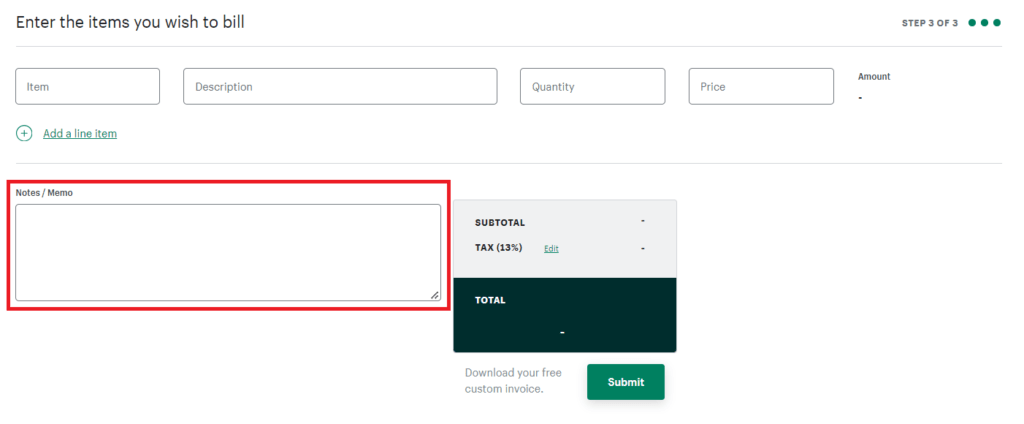
4. Add Notes or Memos: If there are additional details or specific messages for your client, use the memo section to include these notes.
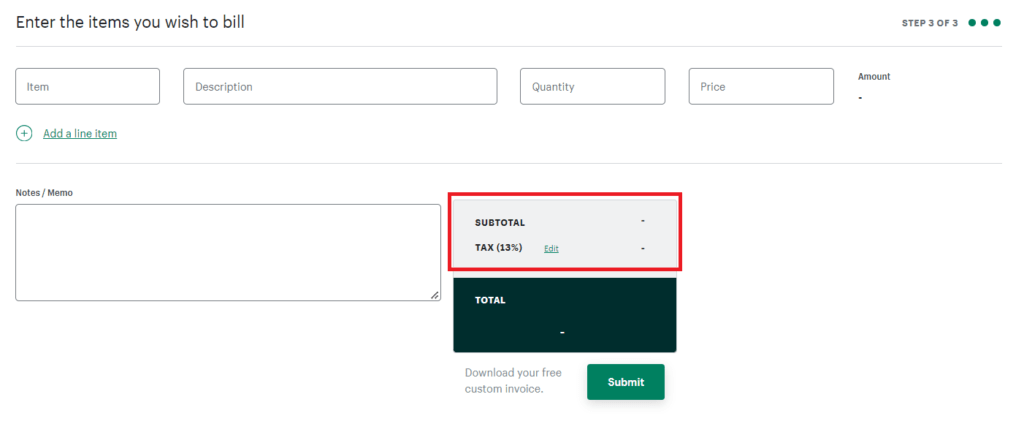
5. Review and Edit Total and Taxes: Check the total amount that the tool calculates. Make any necessary adjustments to the tax line to reflect the appropriate tax rate for your area or specific tax conditions.
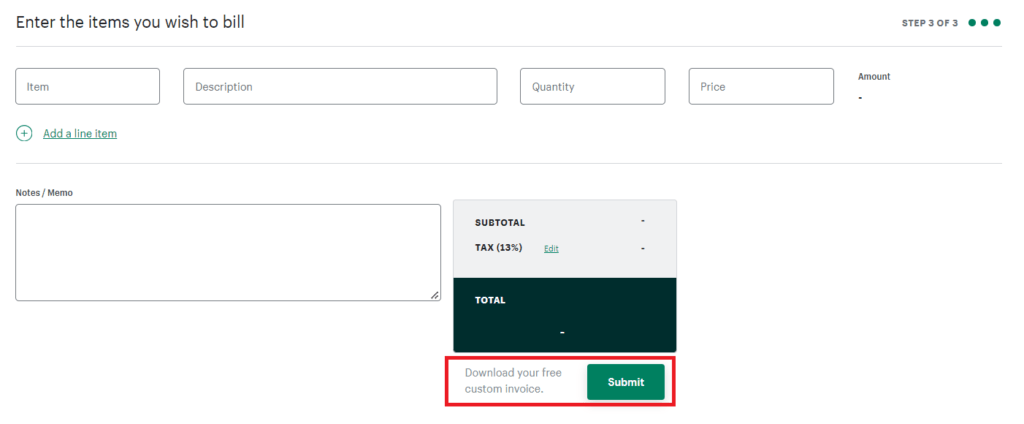
6. Generate the Invoice: After filling in all the required fields and reviewing the details, click the ‘Submit’ button to generate the invoice, which will be sent to your email.
7. Download and Send the Invoice: Once you receive the invoice in your email, download it in a PDF format and send it to your client.
Methods to Send Your Shopify Invoice
- Postal Mail: For those who appreciate traditional methods, consider printing and mailing the invoice. This involves the postal service delivering the physical document to your client’s address. It’s a great choice for clients who prefer tangible documents or when digital delivery isn’t viable.
- Email: Opt for the speed and ease of emailing the invoice. Simply attach the PDF invoice to an email directed to your client. This approach is instantaneous, cuts down on printing and postage costs, ensures prompt receipt by your client, and allows them to store or print the document easily.
Important Basic Information in an Invoice
- Your Business Information: This includes your name, address, and contact details. This information helps your client identify the source of the invoice.
- Client Information: Add the name, address, and contact details of the client. This ensures the Shopify invoice reaches the right person or department.
- Service or Product Description: Give a concise description of the services or products provided. This helps the client understand what they are being billed for.
- Service Date or Duration: Mention the specific date or period during which the services were provided or the products were delivered.
- Total Amount Due: Display the total amount owed, including a breakdown of any additional fees, taxes, or discounts applied clearly.
- Payment Terms: Clarify how and when you expect to be paid. Include due dates, acceptable payment methods, and any late payment policies.
Incorporating this information in your Shopify invoice not only facilitates clear communication about the billing but also helps in setting expectations for timely payment. Also, it might be helpful to use a unique invoice number for tracking, mention any advance payments or deposits made, and include a thank you note or a polite reminder of the importance of timely payment.
Importance of Invoice in a Business
Invoices are a fundamental component in the e-commerce sector, serving several important functions such as:
- Invoices act as official records of transactions, which are essential for compliance with tax laws and other regulatory requirements. They ensure that businesses operate within legal frameworks.
- They are crucial for maintaining detailed financial records. This includes tracking sales, managing cash flow, and aiding in precise bookkeeping, which is vital for financial reporting and audits.
- Invoices provide customers with a detailed account of their purchases, including itemized costs and payment terms. This clarity is key to preventing misunderstandings and disputes over charges.
- They help in monitoring stock levels by reflecting sales data and assisting businesses in managing inventory efficiently. Invoices specify payment terms and deadlines, which can expedite the payment process and enhance cash flow management for the e-commerce business.
- Properly formatted and accurate invoices contribute to a business’s professional image, fostering trust and credibility with customers. Invoices offer an opportunity to communicate with customers post-purchase, potentially including personalized messages or promotions to encourage repeat business.
In summary, invoices in e-commerce are not just transactional documents but are integral to the operational, financial, and legal aspects of online business activities. They support various critical functions, from legal compliance and financial management to customer service and strategic planning.

Written by
Dili