

Padding vs margin
Padding and margin are two fundamental concepts in web design that are crucial for creating visually appealing and well-structured websites. While they might sound similar, they serve different purposes in the layout and spacing of web elements. Let’s dive in to understand the differences between padding and margin in a fun, easy-to-grasp manner!
Padding: Your Element’s Personal Space
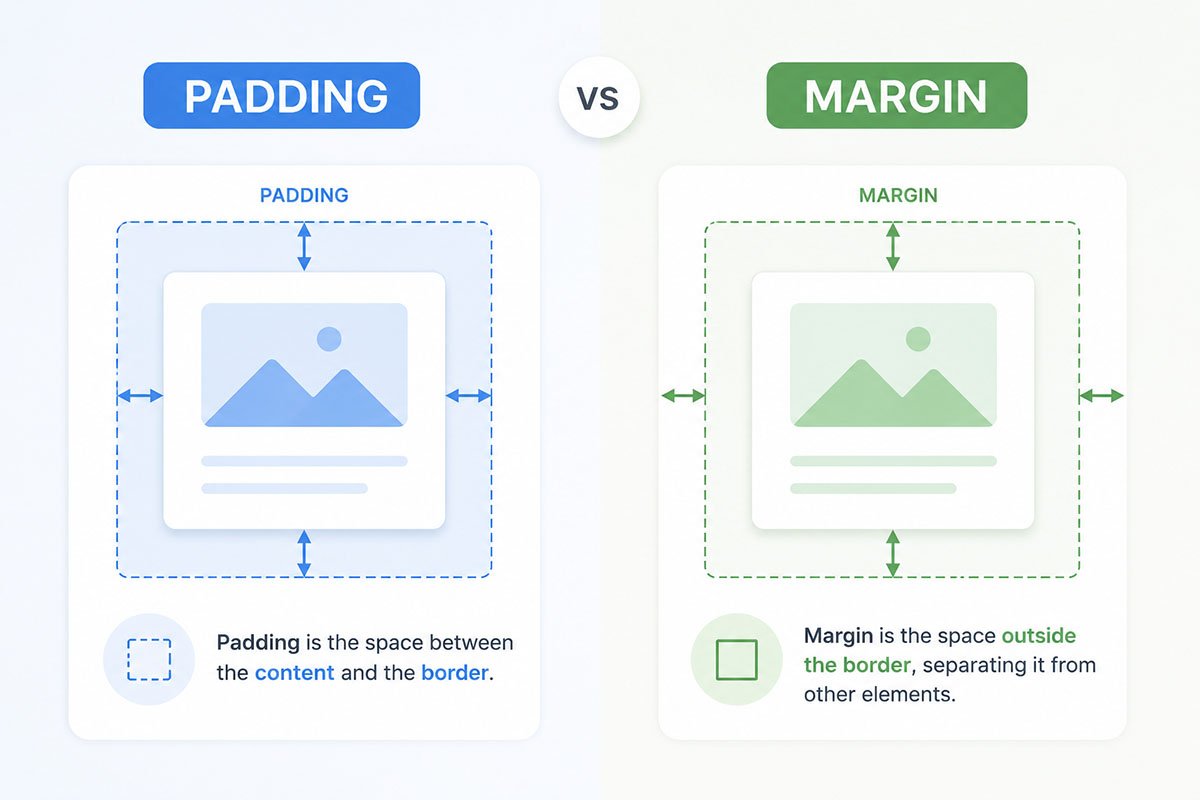
Imagine padding as a cushion or bubble wrap around an element on a webpage. It’s the space inside the border of an element. Padding adds space within the element, making the content inside the element breathe a bit more. If you have a button or a text box, adding padding will make the content inside these elements not feel so cramped.
Example:
button {
  padding: 10px 20px;
  /* Top and bottom padding is 10px, left and right padding is 20px */
}
In this example, the button will have a padding of 10 pixels on the top and bottom and 20 pixels on the left and right. This extra space makes the text inside the button not stick to the edges, creating a more user-friendly and visually pleasing button.
Margin: The Personal Bubble
Now, let’s talk about margin. If padding was the cushion inside your element, margin is the personal bubble or the space outside of it. Margins create space around elements, separating them from other elements. It’s like giving your elements a bit of room to breathe from their neighbors. Margins are essential for avoiding a cluttered look, ensuring that text, images, and other elements aren’t bumping into each other.
Example:
p {
  margin: 15px 30px;
  /* Top and bottom margin is 15px, left and right margin is 30px */
}
In this code snippet, we’re giving paragraphs a margin of 15 pixels on the top and bottom and 30 pixels on the left and right. This spacing makes sure that paragraphs have enough room around them, preventing a squished or overcrowded appearance.
Visualizing the Difference
It’s easier to grasp the difference when you visualize it. Imagine a box — the padding is the space between the content, such as text or an image, and the border of the box. The margin is the space between the box’s border and the next element or the edge of the webpage.
Padding and Margins in Shopify
Applying the concepts of padding and margin in Shopify is quite similar to how you would use them in general web design, but with a few Shopify-specific nuances. Shopify, a popular e-commerce platform, allows users to create and customize their online stores. Here’s how padding and margin play a role in Shopify:
Theme Customization
- Pre-Defined Settings: Most Shopify themes come with pre-designed templates and settings that include default padding and margin values. These settings ensure that the website looks good out of the box.
- Customization Options: Within the theme editor, you can often adjust the padding and margin for various elements like headers, footers, product images, and text blocks. This is done through a user-friendly interface, usually without needing to write any code.
- Responsive Design: Shopify themes are designed to be responsive, meaning they adjust to different screen sizes. Padding and margin settings play a crucial role in maintaining the look and functionality of your store across devices.
Advanced Customization with CSS
If you have specific design needs or want more control over the spacing of elements, you can dive into custom CSS. This is where your knowledge of padding and margin really comes into play.
Example:
.custom-class {
  margin-top: 20px;
  padding-left: 15px;
}
You can add custom CSS like this in Shopify’s theme editor. This code would, for instance, add a top margin of 20px and a left padding of 15px to elements with the class .custom-class.
Liquid Templates
Shopify uses a templating language called Liquid. While Liquid itself doesn’t control padding and margin, it generates the HTML structure of your store. You can add custom classes and IDs in your Liquid templates and then use CSS to apply padding and margin to these elements.
Practical Application
- Product Pages: Adjusting the padding around product images or descriptions can affect how customers view and interact with your products.
- Navigation and Footers: Margins are essential for keeping navigation menus and footer elements spaced out and readable.
- Promotional Banners: Padding within banners ensures that text and images are not too cramped, making promotional content more effective.
Shopify’s Flexibility
Shopify’s flexibility in design customization means that you can apply web design best practices, including the use of padding and margin, to create a unique and engaging online store. Whether you’re tweaking a template or diving into custom code, understanding and utilizing padding and margin effectively can greatly enhance the visual appeal and user experience of your Shopify store.
In Conclusion
In web design, both padding and margin are critical for creating aesthetically pleasing and user-friendly layouts. Padding enhances the internal spacing of an element, while margin handles the external spacing. Both are key tools in a web designer’s toolkit, helping to create orderly, easy-to-navigate, and visually appealing websites.
Remember, a well-padded and well-margined website is like a well-organized room — everything looks better when it’s not crammed together!